For people who build with AI and don't write code

Every other tool hands you a diff. This one hands you a picture of your app working.

Describe what you want to build in a paragraph. StepMate turns it into a plan you actually understand, then your own Claude Code works through it one step at a time — and shows you a real screenshot of your app at every stage.

One-time. Runs on your own computer. Needs Claude Code.

Have a go

This is the actual thing. Watch it sort itself, then press Run.

Pick something you might build. Watch StepMate sort it into steps, then press Run and watch one go green. This is a real StepMate plan running right here in your browser.

localhost:3210 Demo

What do you want to build?

Your plan 0things sorted
Pick one above and watch the plan build itself.
This is real StepMate plan data replaying in your browser. Not a video, and not connected to a live build on your computer.

Sound familiar

“Build me an app.”
…and ten minutes later it looks incredible.

Then you ask for one change, and something else breaks.
It rewrites a file it should never have touched.
Three days later you have four hundred files and a build you're afraid of.
So you start again. Or you quietly stop.

Here's what's actually going on

It isn't the AI's fault. Nobody gave it a plan.

The AI is a genuinely good builder. The problem is you handed a good builder a napkin sketch and said "go". No order, no boundaries, nothing saying what finished looks like. So it guesses, then guesses differently tomorrow, and the two guesses don't match. That's where mush comes from.

And every planning tool was built for developers.

People tell you to go install Linear or Jira. Then it asks you to pick a parent issue, and a sub-issue, and whether to create a branch, and what to call the branch. So you close the tab. You don't put your hand up and say you're lost. You just stop.

StepMate is the version for the rest of us.

How it works

Say it in a paragraph. Get a plan you can read.

Step one

You describe it like you'd explain it to a mate

No structure, no jargon, no forms. One paragraph in your own words. StepMate does the hierarchy, the ordering and the dependencies so you never have to learn what those are.
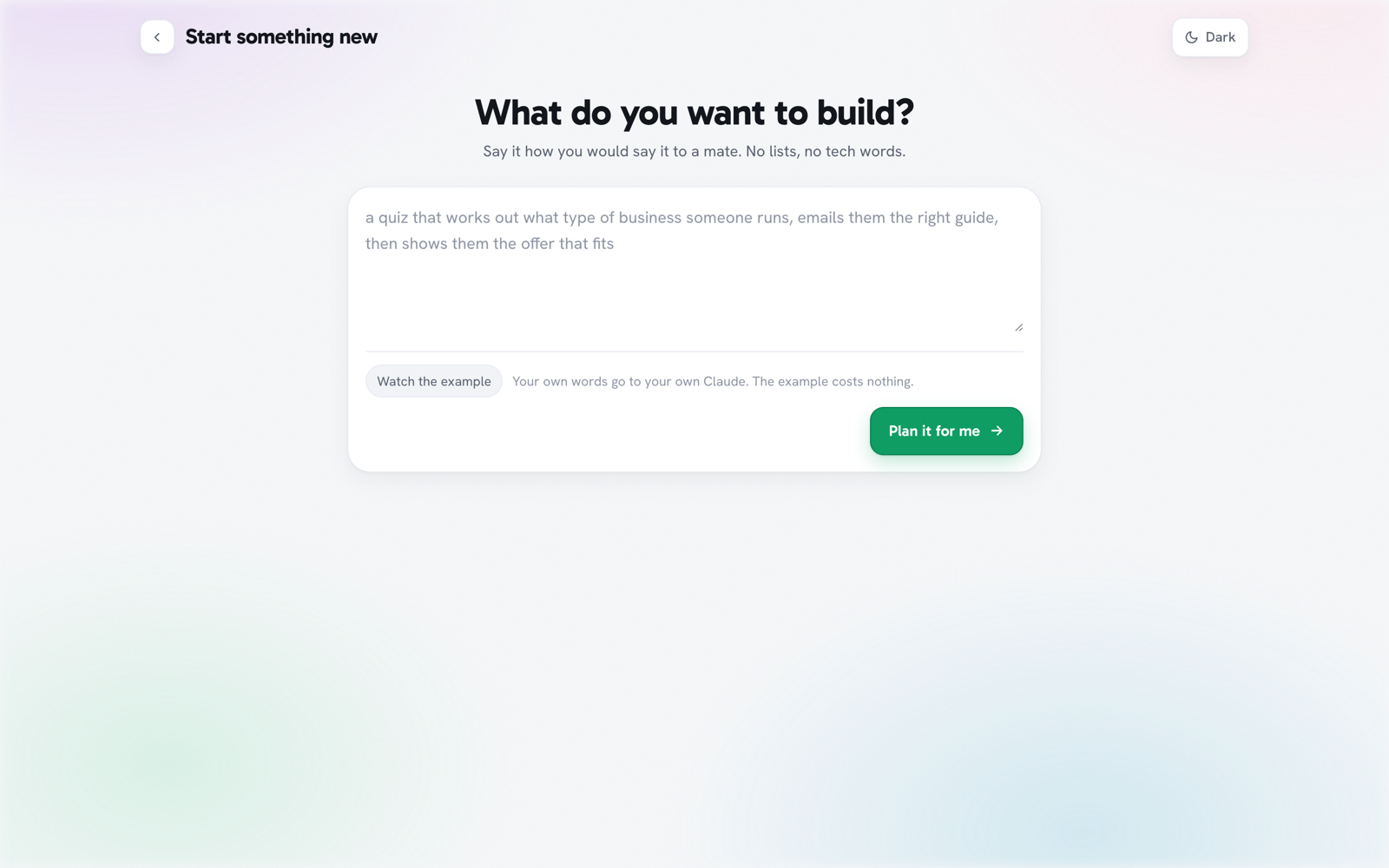
StepMate asking what you want to build, with a single plain text box
Step two

Every step is a sentence that's either true or not

"A visitor sees the first question." "Ask for their email before showing the result." You can tell whether each one is done just by looking at your own app. No reading code, no guessing what 40% means.
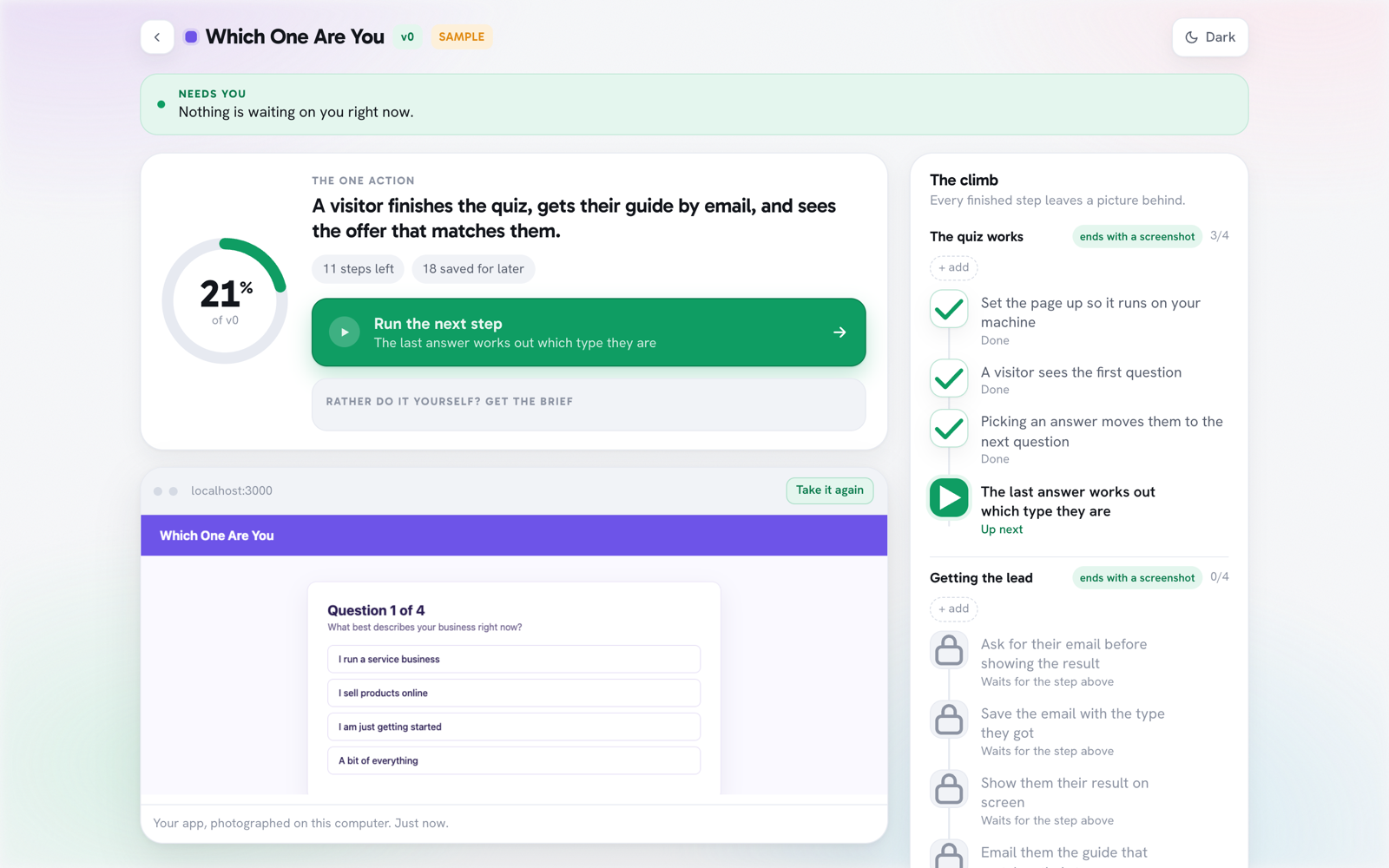
A StepMate plan showing steps in plain English with a progress ring
Step three

Press one button. Your own AI does the work.

No wall of code, no terrifying log. Just a calm line telling you what's happening, and then a card showing exactly what changed — with an Undo button next to it.
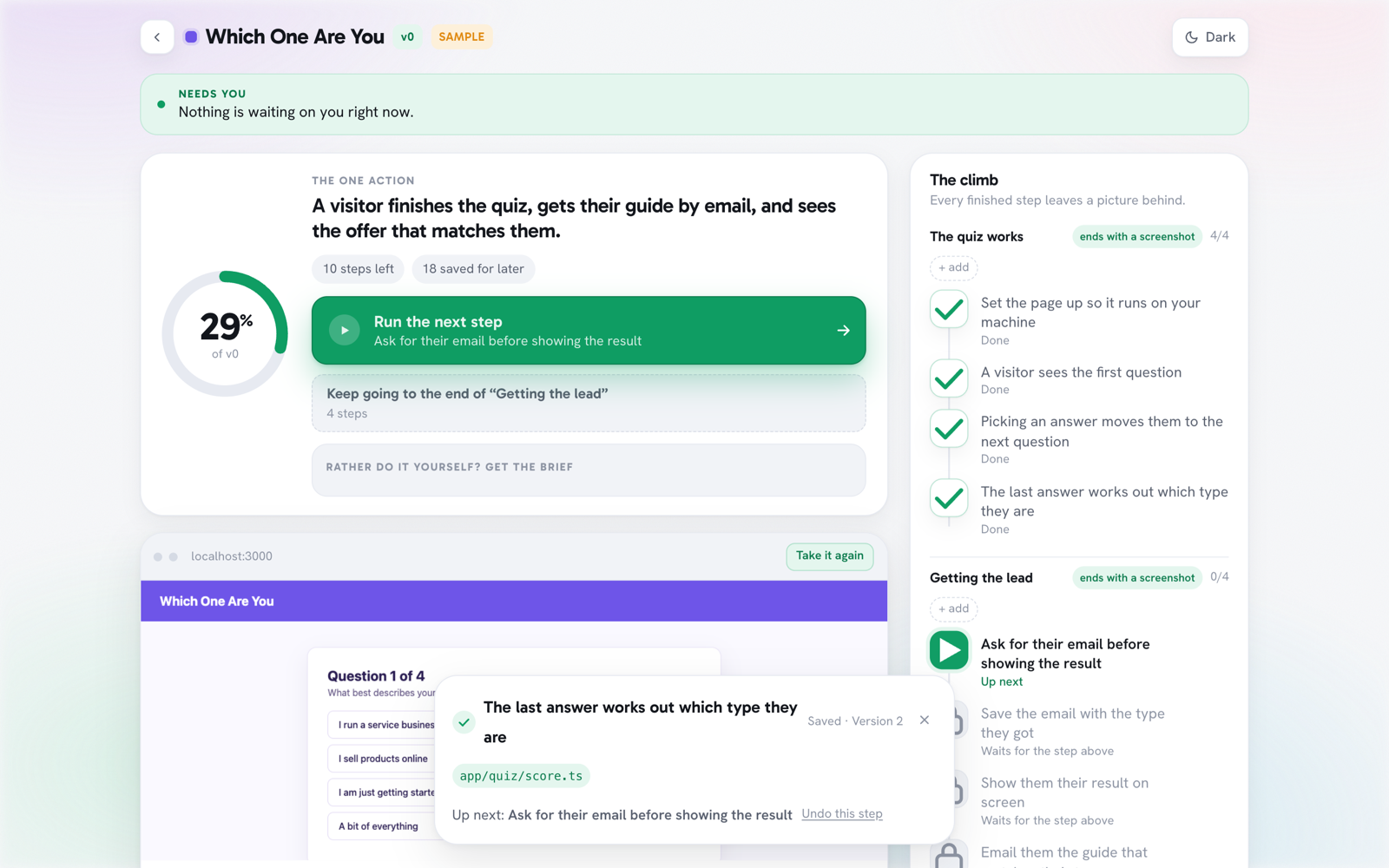
StepMate finishing a step, with a win card showing the file it changed and an undo button
A real step, finished. Note "Saved · Version 2" and Undo this step.

The bit that matters

You shouldn't need to read code to know your own thing works.

This is the whole difference, and it's the reason StepMate exists.

Every other tool ends here
- const handler = (req, res) => { - return res.json(payload) + export async function POST(req: Request) { + const body = await req.json() + return Response.json({ ok: true }) } - import { legacy } from './old' + import { score } from './quiz/score'

A diff. If you can't read it, you have no idea whether it worked.

StepMate ends here
StepMate showing a real screenshot of the buyer's own app running

A picture of your app. Working. Taken just now, on your machine.

Why the plan holds up

Three rules that stop this becoming another abandoned folder.

01

One step, one save point

Every step is saved on its own. Undo any single one, six months later, and nothing else moves. That's what makes a build fixable instead of disposable.

02

It can't lie to you

A step only goes green when files actually changed on your disk, never just because the AI says it's done. If it didn't really happen, it doesn't count.

03

Three builds at a time. That's the limit.

While three are unfinished, StepMate refuses to start a fourth. Finish one, or park it, and the slot frees up. That one rule is what stops this turning into the graveyard of half-finished projects you already have.

No surprises

What it costs to actually run.

StepMate uses the Claude subscription you already pay for. There are no credits to buy and nothing to top up. Here are the real numbers. Measured, not estimated.

A few centsTo plan a whole build
~$1Per step it builds for you
$12–17A complete first version

And it tells you before it spends anything. Press "Keep going" and it says exactly how many steps and roughly what it'll cost, before it starts. It all runs on your computer, your plans live in a folder you own, and the only thing StepMate ever sends out is your licence key, once, to check it's valid.

You'll need Claude Code. That's the version of Claude that runs on your computer and can open files — not claude.ai in a browser. StepMate uses it to do the building, so if you're only using AI in a browser tab, this isn't for you yet. Claude Code is here if you want it. Also works on Mac and Windows.

Who's behind this

Made by someone who watches people quit.

StepMate is made by me, Luke Maguire. I've spent 10+ years building software tools for people who don't code, and I built this one because I was sick of watching smart people abandon their builds three days in. If you get stuck, you're dealing with my team, not a ticket queue.

Get it

One payment. It's yours.

$397

One time. Not a subscription, no credits, no upsell.

$397 holds for the final 8 early-bird spots. When they're taken, the price rises.

  • StepMate on your own computer, yours to keep
  • Up to three builds running at once
  • Updates included, and it tells you when there's one
  • Install in about five minutes, two steps
  • A "Something's wrong" fix you run yourself in Claude Code
Get StepMate now

Your licence key and setup link arrive by email.

The guarantee

Finish your first build in 30 days, or get DOUBLE your money back.

Use StepMate, follow the instructions, and work with us when you get stuck. If your first build still isn't finished within 30 days, we refund you twice what you paid. $397 in, $794 back. Finished means every step in your first plan is marked done. To claim, reply to your welcome email between day 30 and day 45.

Questions people ask.

Do I need to know how to code?

No. That's the entire point. You describe what you want in plain English, and every step StepMate writes is a plain sentence, not a technical task. If you were comfortable with code you'd just use Linear like a developer.

What if I don't finish a build?

That's what the guarantee is for. Use StepMate, follow the instructions, and work with us when you get stuck. If your first build still isn't finished within 30 days, we refund you double what you paid. Finished means every step in your first plan is marked done, and you claim by replying to your welcome email between day 30 and day 45. The whole product exists so you finish; we're happy to be on the hook for it.

Is this hard to install?

Two steps. You download it, then paste one block of text into Claude Code and it does the rest — including checking the code before it runs anything. About five minutes.

What if I get stuck?

There's a "Something's wrong" prompt you paste into Claude Code. It looks at your own install, tells you in plain English what's up, and fixes what's safe to fix. If that doesn't sort it, you reply to your welcome email.

Does it write the whole app for me?

Honestly: no, and be careful of anything that claims it does. StepMate plans the build and then runs your Claude Code, one step at a time, checking the result. The planning and the proof are what make the difference — that's where builds fall apart.

Where does my work live?

In a normal folder on your computer that you own. StepMate never uploads your projects anywhere. It runs entirely on your machine.

Can I use it on more than one computer?

Yes. Your key works on up to three computers of your own, and re-installing or updating on a computer you already use never counts against you. That's separate from the three-builds limit, which is about how many unfinished projects you can have going at once.

Mac or Windows?

Both. There's a double-click launcher for each.

You're going to keep building things with AI.

The only question is whether the next one is another project you abandon, or the first one you actually finish. $397 holds for the final 8 early-bird spots, and the guarantee pays you double if you don't finish. The real risk is not trying it.

Backed by the 30-day double-your-money-back guarantee.